
Public spaces
Meeting room indirect lighting
Meeting rooms used to be lit for the table. Now they are lit for faces – because half the participants are behind a camera. Indirect light is the only kind that does it without shadows.

Video conferencing changed the task
A traditional meeting room was lit with downlights above the table: 500 lux on the paper, and faces left in the shadow of light from above – dark eye sockets, a shiny forehead. On camera it looks tired and untrustworthy. When half the meeting watches the participants on a screen, the lighting’s job is faces, not the table.
Indirect light from the ceiling edge solves this: the light comes from the whole ceiling as a large surface, so it reaches faces from the front and sides without hard shadows. It is the same principle as a photographer’s softbox – a large soft source, not a point.
Three light levels
| Level | Source | Intensity | Job |
|---|---|---|---|
| 1. Indirect general light | LED strip at the ceiling edge around the whole perimeter | 300-400 lx on faces | Faces on camera without shadows, no glare on the screen |
| 2. Table light | Pendant or downlights above the table | 500 lx on the table | Papers, notes – dimmed during presentations |
| 3. Wall light | Strip on the wall opposite the screen, or above the whiteboard | 100-200 lx | The background on camera is not a black hole; artwork, logo |
In practice: a 12-person room 5 × 7 m, height 2.8 m, screen on the end wall
Perimeter 24 m, the screen wall is left out → 19 m of strip. On the screen wall the light would reflect in the screen and make the background bright. As a result the camera sets its exposure for the background and faces go dark.
17 W/m because of the tall room = 323 W → two 200 W DALI drivers, one for each long side. Four scenes:
- “Meeting” everything at 100 %
- “Video” indirect 80 % + table 30 %
- “Presentation” indirect 30 % + table 0,
- “Off”
Materials about €1,500, DALI controller and buttons €400.
Meeting table lighting
I asked an AI to generate a traditional meeting room. The meeting table lighting is ‘OK’, but nobody really enjoys being in a box like that. Then I started adding lighting to it.
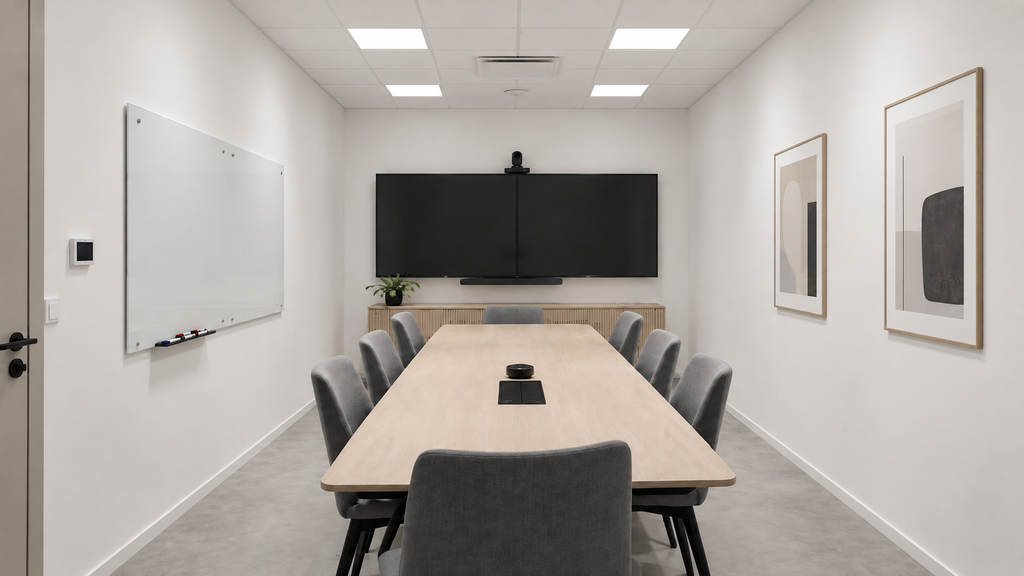
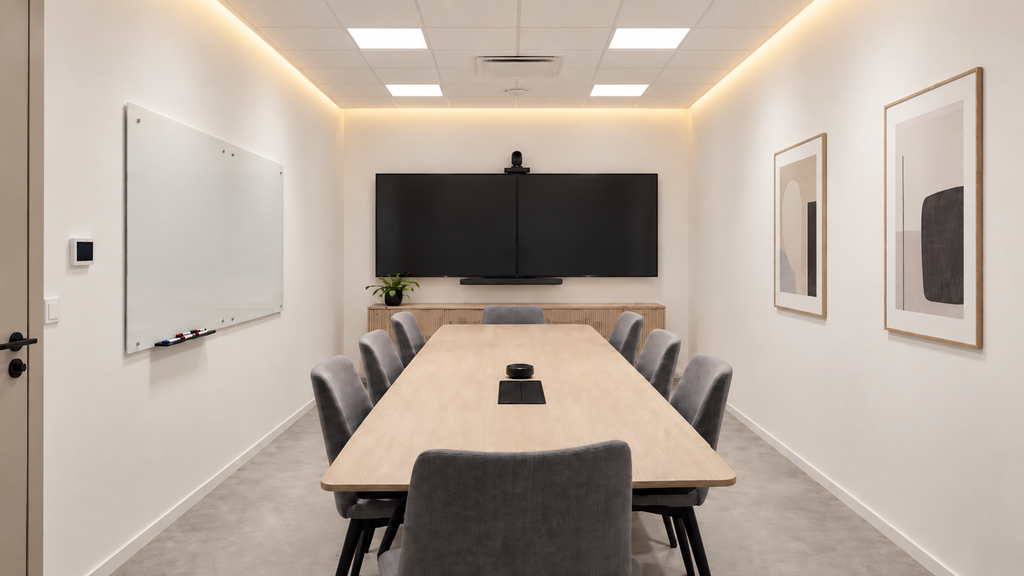
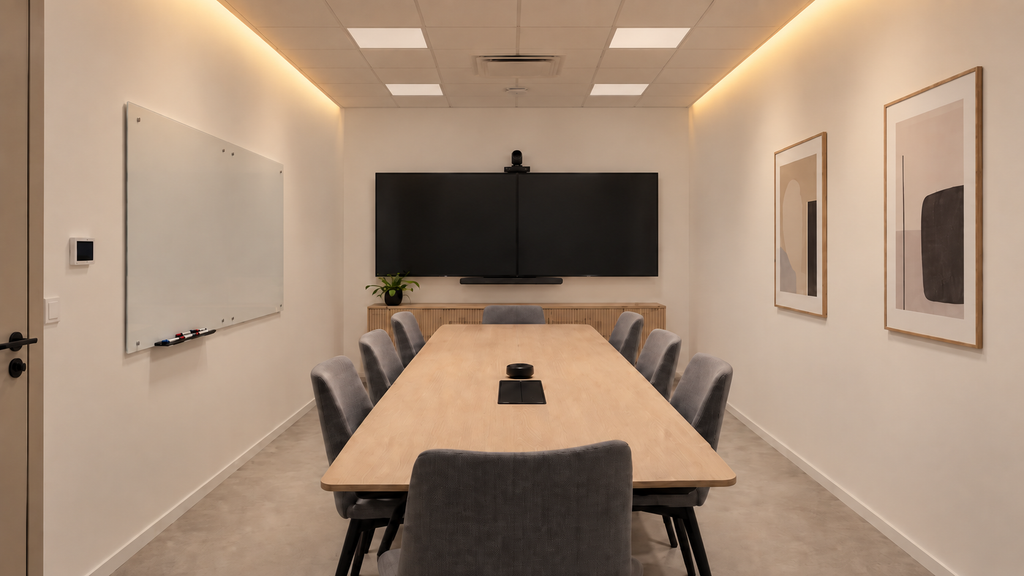
I wanted to show how much the space changes just by adding indirect light. It becomes more pleasant and more versatile. Below are two AI images; the second shows ‘presentation mode’, with the light on the video wall off and the rest dimmed. The difference from the original is huge! The pastries taste better here!
Four requirements that differ from a home
- No light on the screen wall. The camera exposes for the brightest area. If the background is bright, faces stay dark. The strip is left off the screen-side wall, or aimed only at the ceiling.
- CRI 95 or better. A camera sees colours more mercilessly than the eye. Below 90 makes skin look greenish or grey. This matters more in a meeting room than in any room at home.
- Flicker-free. Driver PWM frequency above 1 kHz – below that the camera shows stripes. A cheap dimmable driver flickers at 60-500 Hz, and it shows on video even though the eye does not see it.
- Scenes, not switches. The meeting chair does not adjust three dimmers. One button: Meeting / Video / Presentation / Off. DALI or Zigbee.
Colour temperature 4000 K, and the same throughout the room
Neutral 4000 K keeps participants alert and shows skin tone correctly on camera. Warm 3000 K makes a meeting sleepy and faces yellowish. All three light levels in the same tone – a mix of two tones shows on camera immediately.
Control – DALI or Zigbee
Office buildings often have a DALI bus for other lights, and the indirect light is connected to it – the driver is then a DALI driver and the scenes are programmed into the same system. If there is no bus, Zigbee works just as well and the cabling is cheaper. In both, one button by the door and another at the end of the table for the chair.
Presentation mode is the most important: indirect light dims to 30 % so the screen stands out, but does not go off – people are still taking notes. A completely dark room and a bright screen tire the eyes in twenty minutes.
| General light on faces | 300-400 lx, measured at 1.2 m height – not on the table |
| Strip power | 14.4 W/m for a 2.5 m room, 17 W/m above 2.7 m |
| Colour temperature | 4000 K, the same at every level |
| CRI | ≥ 95 |
| PWM | > 2 kHz – camera |
| Screen wall | No strip, or aimed only at the ceiling |
| Control | DALI if there is a bus, otherwise Zigbee. 4 scenes, 2 buttons |
Office – the same principle for workstations → · Dimming and control → · For architects – standards →
Public space lighting → LedStore
Frequently asked questions
How is indirect lighting done in a meeting room?
At the ceiling edge around the whole perimeter except the screen wall. Indirect light comes from the whole ceiling as a large surface and lights faces from the front without shadows – which is decisive for video meetings.
What lighting suits a video meeting?
Indirect general light from the front and sides, 300-400 lx on faces, not from behind. CRI 95, 4000 K, driver PWM above 2 kHz so the camera shows no stripes. No light on the screen wall.
How much light for a meeting room?
300-400 lx on faces measured at 1.2 m height, 500 lx on the table. Face lighting matters more than the table – size it for the height of seated people.
Should meeting room lighting be dimmable?
Yes, with scenes: Meeting, Video, Presentation, Off. During a presentation the indirect light dims to 30 % but does not go off – people are still taking notes.
Why does the LED strip show as stripes on video?
The driver’s PWM frequency is too low, 200-500 Hz. The camera sees it even though the eye does not. Choose a driver with PWM above 2 kHz.
DALI or Zigbee for a meeting room?
DALI if the building has a DALI bus for other lights – then everything is in one system. Otherwise Zigbee, cheaper cabling and equally good scenes.
Toteutettuja kohteita
Katon ja seinän reuna toteutettuna
Verhoprofiili, ura ja pintaprofiili katon rajassa – viisi tapaa käsitellä kulma.
Kuvat: LedStore.fi toteutetuista kohteista.